


RetroArch 1.22
Games run on RetroArch 1.22.2 with an up-to-date PCSX-ReARMed, built from source for the console. Your memory cards keep working.

Lumen PSX · for the PlayStation Classic
Lumen PSX turns the console into a cinematic game library for your PlayStation and cartridge classics, running on RetroArch 1.22. Unzip it to a USB stick, plug it in, play.
Take the tour
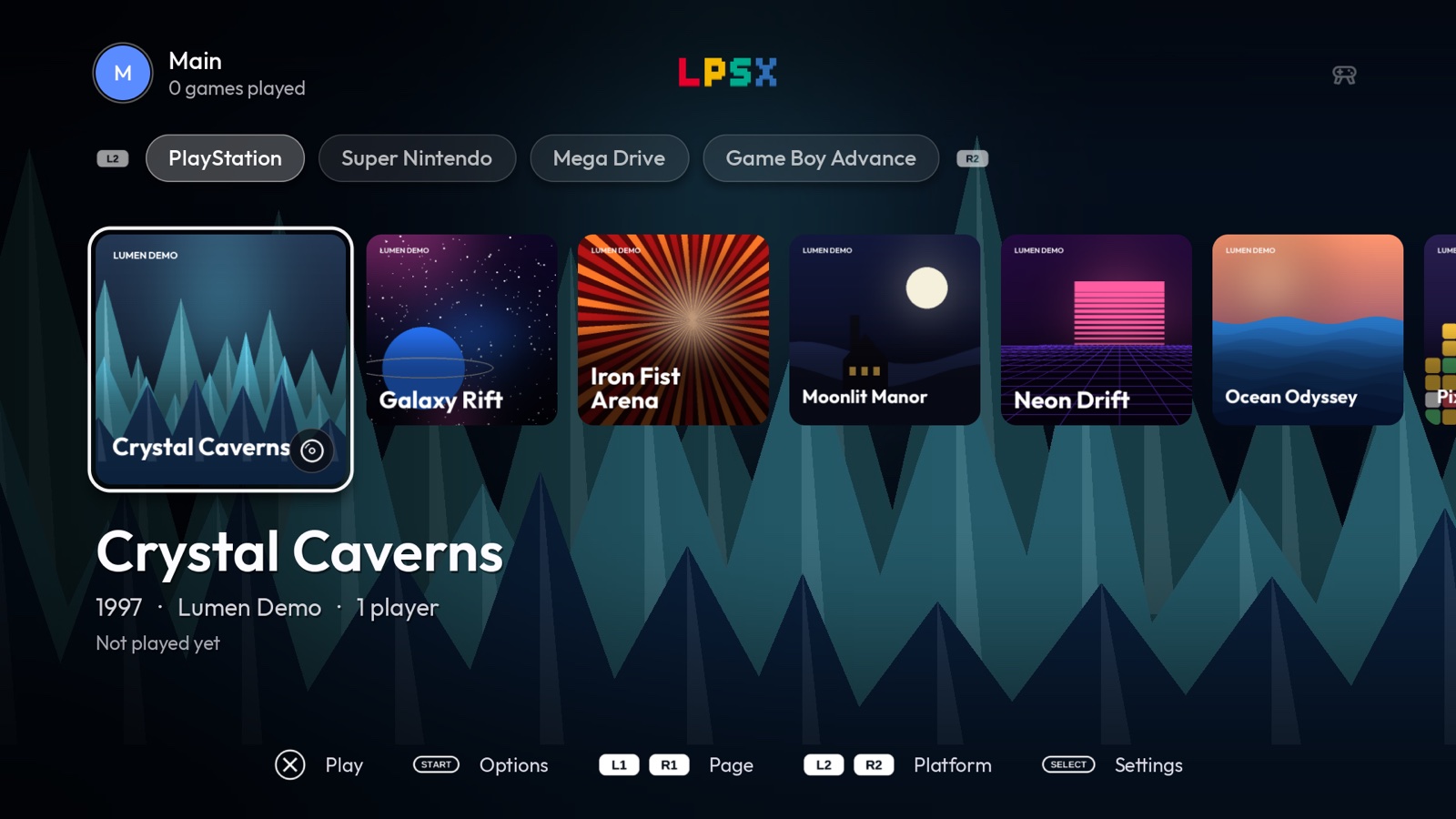
Full-screen art for the selected game, a row of covers, title, year and play time. Backgrounds crossfade as you browse, and each game can have its own music.
Press Play
Each system launches with its own machine, drawn flat after the real hardware: its proportions, its parts, its plastics. It drops onto a field of the game’s colour, the game goes into it and seats with a click, and its screen lights up and becomes the picture.
The lid stands up, the disc lands on the spindle and the lid shuts over it.
The Game Pak drops straight into the slot on top and seats with a click.
The cartridge drops into the top slot and stands there, label facing you. The console takes the push.
Into the slot in the round panel. The lamp lights and the console gives a hop.
The Game Pak goes in flat through the front door, label up, and the door shuts behind it.
The cartridge slides in behind it, the screen lights up in its greens and grows into the frame.
The pak slips in at the back, the screen comes on and grows until it is the picture.
The UMD goes in at the back, and the wide screen lights up and fills the frame.
A coin drops into the coin door, edge first, and the cabinet’s screen comes on.
No machine to draw, so the program’s own cover floats on the field and grows into the frame.
What’s inside
Games run on RetroArch 1.22.2 with an up-to-date PCSX-ReARMed, built from source for the console. Your memory cards keep working.
NES, Super Nintendo, Mega Drive / Genesis, Game Boy, Game Boy Color, Game Boy Advance, Nintendo 64, PSP and arcade cores included, plus a tab for your own homebrew apps.
Every launch shows that system’s own machine, drawn flat after the real thing. Your game goes into it and seats with a click, then its screen or its power lamp lights up.
Original, Enhanced or Native per platform: PlayStation gets PCSX-ReARMed’s high-resolution renderer, Nintendo 64 and PSP can render at the display’s own resolution. A CRT filter is one setting away.
RESET restarts the game. OPEN pauses it and lets you continue, save and exit, quit or swap discs. POWER suspends the console and brings your session back.
Keep the games you play most one press away, and sort the rest into folders of your own. Each profile has its own.
“Save and exit” keeps the exact moment you stopped. The next time you press Play, Lumen offers to pick it up from there.
Colours, fonts, button glyphs, menu music and system logos come from a theme folder on the stick. Pick one in Settings.
A modern compositor (Wayland 1.26 + Weston 16) with direct scanout keeps the 1080p dashboard near 60 fps.
English, Spanish, Portuguese, French, German and Italian, switched live.
Everything runs from RAM and the USB stick. Unplug it and the console is exactly as it came from the factory.
No other mods needed. A fresh stick lists the console’s 20 built-in games so you can play right away.
Under the hood
Built from upstream sources by psc-platform and loaded into RAM at every boot. The kernel, glibc and the PowerVR GPU driver stay exactly as Sony shipped them.
| Component | Stock console | Lumen PSX |
|---|---|---|
| RetroArch | Sony’s own emulator | 1.22.2 |
| PCSX-ReARMed | — | upstream (2026) |
| Compositor | Weston 1.11 | Weston 16.0.2 |
| Wayland | 1.12 | 1.26.0 |
| libdrm | 2.4.6x | 2.4.124 |
| Controller profiles | — | RetroArch v1.22.0 set |
| SDL | 2.0.4 | SDL3 3.4.20 + sdl2-compat |
| OpenSSL | 1.0.2 | 4.1.0 |
| Wi-Fi | — | wpa_supplicant 2.12 |
| Bluetooth | — | BlueZ 5.88 |
| Kernel modules | — | overlayfs, xpad, Wi-Fi, Bluetooth, USB Ethernet |
Install
FAT32, named SONY.
Extract lumen-psx-vX.Y.Z.zip at the root of the stick.
Lumen starts on its own. Add games to games/<system>/, or use the library manager.
Prefer the browser? Install or update from here: it writes only what changed.
Want the original menu back? Create an empty file lumen/disable-boot on the stick, or simply unplug it.
Library manager
Plug the USB stick into your computer and open it in Chrome or Edge. Nothing is uploaded: files are read and written on your machine.
Open the library manager